Mousepad Buying Guide: Materials, Sizes, and Styles Explained
Introduction
In the modern era of computing, where precision and comfort reign supreme, selecting the right mousepad can profoundly influence your daily interaction with your computer. Whether you are a gamer chasing split-second reactions, a graphic designer demanding flawless cursor control, or an office worker seeking ergonomic relief, a quality mousepad serves as the unsung hero beneath your mouse. Far from being a mere accessory, it enhances sensor accuracy, reduces wear on your mouse's feet, and protects your desk surface from scratches. This comprehensive buying guide delves into the critical aspects of mousepads: materials, sizes, and styles. By understanding these elements, you can make an informed decision that aligns with your needs, budget, and setup. We explore everything from traditional cloth surfaces to cutting-edge glass options, ensuring you navigate the vast market with confidence.
Gone are the days when mousepads were simple rubber mats; today's offerings boast advanced textiles, embedded lighting, and custom designs. With prices ranging from a few pounds to over £100 for premium models, the choices can overwhelm even seasoned buyers. Factors such as mouse type—optical, laser, or trackball—play a pivotal role, as does your desk space and usage intensity. This guide equips you with the knowledge to avoid common pitfalls, like opting for a slippery surface that frustrates precision tasks or a tiny pad that forces constant repositioning.
Understanding Materials: The Foundation of Performance
The material of a mousepad directly dictates its glide, durability, control, and maintenance requirements. Let's examine the primary categories, each tailored to specific user preferences and hardware.
Cloth or fabric mousepads remain the most popular choice, prized for their balance of speed and control. Typically constructed from polyester or nylon weaves over a rubber base, they provide a textured surface that grips the mouse feet just enough to prevent unwanted skidding. These pads excel with optical and laser mice, offering consistent tracking across vast areas. High-end cloth pads feature micro-textured surfaces, akin to those on professional gaming mats from brands like SteelSeries or Artisan. Their softness cushions wrist strain during extended sessions, and they are machine-washable, ensuring longevity. However, they attract dust and oils from your hands, necessitating regular cleaning with a damp cloth and mild soap.
Hard mousepads, often made from plastic, polycarbonate, or anodised aluminium, appeal to speed enthusiasts. These deliver a glass-like glide, ideal for fast-paced gaming where low friction translates to lightning-quick flicks. Aluminium variants, such as the PPQ from Skypad, incorporate a coated finish that mimics ice rinks, boosting mouse sensor performance. They resist wear far better than cloth, showing no degradation after years of use. Drawbacks include minimal control for intricate movements—your cursor might overshoot targets—and a rigid feel that offers no wrist padding. Hard pads suit low-sensitivity setups, where large arm sweeps dominate over fine finger adjustments.
Hybrid mousepads blend cloth and hard surfaces, providing versatility. A prime example is the Razer Gigantus V2, with a cloth top over a firm base, allowing speed in the centre and control at the edges. These cater to mixed workflows, from gaming to editing, and often include stitched edges to prevent fraying. Leather mousepads, crafted from genuine or synthetic hide, offer a premium, smooth glide with natural grip. They age gracefully, developing a patina that enhances tracking, but require conditioning to avoid cracking. Glass mousepads, like those from Aothia, represent the pinnacle of smoothness, with etched patterns for subtle friction. Etched glass provides laser-precise tracking but demands a steady hand, as any tremor amplifies cursor movement.
Rubber mousepads, the budget baseline, feature a smooth neoprene surface. While affordable and portable, they wear quickly and falter with modern high-DPI mice, leading to erratic tracking. Advanced materials like carbon fibre composites in pads from Func Surface elevate durability, resisting heat and moisture for tournament-grade reliability. When choosing materials, consider your mouse's sensor: cloth for versatile opticals, hard for aggressive laser mice. Test samples if possible, as personal glide preference varies—speed demons favour hard surfaces, while control freaks lean towards cloth.
Thickness influences stability; slim pads (1-2mm) flex under pressure, whereas thicker ones (4-6mm) anchor firmly, reducing desk vibrations. Anti-slip rubber bases are non-negotiable for all types, preventing slides during intense use.
People Also Look For:
- Geometry Large RGB Gamer Mousepad 40x90cm Mouse Mat Gaming Mousepads LED Keyboard Mats Luminous Desk Pads Mouse Pad For PC
- Custom Gamer, Playmat Mats Printing ,Custom Image Tabletop Gaming Mat 1200x500 Mouse Pad ,Gaming Custom for, Personalized Gifts
- Formula 1 Racing Circuit Mouse Pad Desk Mouse Pad Cute HD Desk Pad Extended Gaming Keyboard Mats Large XXL Gamer Mousepad 90x40
- Mouse Pad Gamer XXL Custom Mouse Mat P-pokemon Mimikyu Desk Mats Table of Office Carpet Gamer Natural Rubber Mice Pad Mousepad
- XS Desk Rug Kawaii Pink Cloud Cute Table Pad Gaming Small Mouse Mats Rubber Keyboard Mats 18x22cm Anti-slip Best Choice Mice Pad
Sizes: Matching Your Space and Workflow
Mousepad size profoundly impacts usability, dictating whether you employ arm or wrist aiming. Dimensions range from compact to desk-engulfing, each suited to distinct environments.
Small mousepads, measuring around 20x25cm, suit laptops and cramped desks. They accommodate fingertip grippers who rely on minimal desk space, focusing cursor control within a tight radius. Ideal for office tasks like spreadsheets or browsing, these pads prioritise portability—foldable models fit neatly into bags. However, gamers find them restrictive, as frequent recentring interrupts flow.
Medium sizes, approximately 30x25cm, strike a versatile balance. They support hybrid arm-wrist techniques, fitting most standard desks without dominating. Brands like Logitech offer these with wrist rests, enhancing comfort for eight-hour workdays. Perfect for general computing, they provide ample room for mouse lifts without edge-hitting frustration.
Large mousepads, spanning 40x30cm or more, cater to low-sensitivity gamers who sweep their entire arm. These allow uninterrupted 360-degree turns in FPS titles, with surfaces textured for consistent tracking. The Corsair MM300 exemplifies this, boasting stitched borders that withstand aggressive swipes.
Extended or desk mats revolutionise setups, covering 90x40cm or full desks up to 120x60cm. These transform your workspace into a seamless glide zone, incorporating keyboard areas with hybrid textures—smooth for mouse, grippy for keys. QcK Infinity from SteelSeries excels here, with water-resistant coatings for spill-prone areas. While imposing, they eliminate desk inconsistencies, boosting precision in creative suites like Adobe Photoshop.
Extra-large XXL pads exceed 100x50cm, ideal for multi-monitor battlestations or sim racing. They demand generous desks but reward with unparalleled freedom. Consider your setup: measure desk depth, accounting for keyboard and peripherals. Oversized pads risk curling edges if not weighted properly, so opt for rigid cores in giants.
Vertical orientation suits some, maximising portrait desk layouts, while circular novelty sizes add flair for casual users. Ultimately, size correlates with DPI settings—high DPI thrives on small pads, low DPI demands expanse.
Styles: Personalisation and Functionality
Mousepad styles elevate functionality beyond basics, incorporating design, ergonomics, and tech.
Plain styles offer unadorned performance, focusing on surface purity. Stitched-edge variants, like HyperX Fury, prevent peeling, extending life by years compared to glued borders.
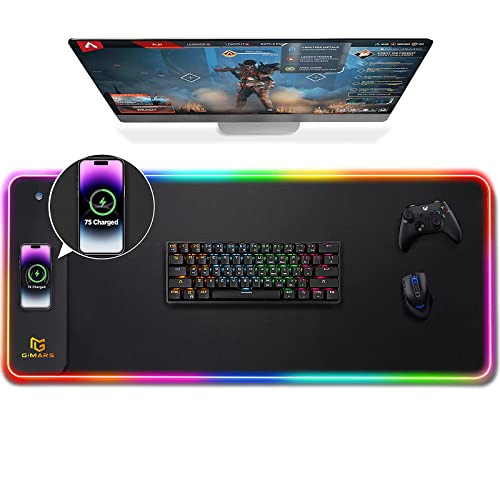
RGB illuminated pads integrate LED lighting, syncing with games via software like Razer Synapse. Aura-lit edges create immersive setups, though they inflate costs and require USB power. Custom-printed styles allow personalisation—upload photos for motivational art or clan logos, courtesy of services like Redbubble.
Ergonomic styles feature gel wrist rests, cradling your wrist to combat RSI. Rounded cushions distribute pressure, vital for prolonged use. Hard-surface ergonomics pair aluminium with memory foam, blending speed and support.
Extended styles double as desk protectors, with segmented zones for mouse, keyboard, and trackpad. Waterproof neoprene variants shrug off coffee spills, maintaining glide post-cleaning.
Portable styles, rollable or foldable with carry cases, suit travellers. Gaming-specific styles boast tournament certifications, like those passing NVIDIA Reflex tests for latency minimisation.
Novelty styles include anime-themed cloths or metallic finishes mimicking sci-fi tech. Thickness variations yield cushioned "pillow" pads for comfort or ultra-thin "zero-friction" racers.
Wireless charging integration in pads like Razer Firefly fuses utility with style, powering mice mid-game. Anti-fungal treatments in leather styles ensure hygiene in humid climates.
Additional Considerations for Smart Buying
Beyond core categories, evaluate thickness (3-5mm optimal for balance), price (£5-£15 budget, £20-£50 mid-range, £50+ premium), and brand reputation. Razer, SteelSeries, and Artisan dominate gaming; Amazon Basics suffices for offices.
Maintenance varies: cloth wipes clean, hard surfaces spray-and-wipe. Warranty lengths indicate quality—lifetime edges on top tiers.
Test compatibility: low-friction pads amplify jittery sensors; textured ones tame aggressive lasers.
Budget wisely: invest in stitched, thick bases for daily drivers.